Showing posts with label Softwares. Show all posts

Monday, 27 February 2012

Keyboard Tracer v1.8


Keyboard Tracer v1.8 || File Size : 744.32 KB. 


Keyboard Tracer is an easy-to-use tool to record keyboard and monitor keystrokes on your own computer. It can track activities of other people using your keyboard without your permission. Keyboard Tracer runs in invisible mode automatically after Windows starts up.

Do you wonder what your spouse, your kids, or your employees are doing on the computer when you are not around? Do they hide windows as you walk by? If you want to know every word, every web page, and every program used then Keyboard Tracer is for you.

Keyboard Tracer will record everything typed on the keyboard. Keyboard Tracer not only captures standard alphanumeric keystrokes, but also captures "hidden" characters and keystroke combinations, such as the Shift and Ctrl key, as well as "true" keystrokes which may other-wise appear differently on screen (such as an * when a password is typed).

Key Features
Logs all the keyboard events, including function keys such as F1, Home etc.
Perfect logger interface
Built-in intelligent logger engine, very very low CPU & memory consuming
Runs invisibly in the background; Of course if you like to display the logger, you can make it visibly


Installation

1. Unpack rar archive
2. Run the setup
3. Use the given serial to activate
4. Enjoy


Thursday, 26 January 2012

MP3 Cutter Joiner Full Version Free Download


Fast MP3 Cutter Joiner cuts and trims a large MP3 file (up to 10 GB) into multiple smaller pieces, and joins multiple MP3 files into a single MP3 as well.

Fast MP3 Cutter Joiner cuts MP3 file by file size, pieces count, time duration, and custom selections. The software provides a slider bar to visually position a cut points where you want to cut. You can also preview every custom piece, and cut with forward and backward overlap, fade-in and fade-out. The MP3 cutter keeps ID3 tags information and supports to custom title of target MP3 ID3 tag. For example: add sequence number to title, which makes you can identify output pieces in your MP3 player, iPod, and iTunes easily.

To save your time, Fast MP3 Cutter Joiner also supports batch cut, you can cut a batch of MP3 files at a time. The software cuts MP3 files directly without re-encoding, so it is fast and exactly keeps sound quality of original MP3 files.

The MP3 joiner accepts any MP3 files; even they're encoded different encoding parameters such as sample frequency, bit rate, and channels. And you can customize encoding parameters of target MP3. The software also supports batch join. The feature allows you to insert one or more MP3 files to beginning of a batch MP3 files, and append one or more MP3 files to end of a batch MP3 files.

Fast MP3 Cutter Joiner is full compatible with Vista and Windows 7 (both 32-bit and 64-bit editions).


Top 8 Benefits of Fast MP3 Cutter Joiner:
  1. Cut MP3 files
  2. You can cut a large MP3 file into multiple smaller pieces by file sizepieces counttime duration or custom selections. The software also support batch cut.
  3. Join MP3 files
  4. Fast MP3 Cutter Joiner joins multiple MP3s into a single file. The software supports MP3 file encoded with all kinds of encoding parameters. You can join MP3 files in batch using the software.
  5. Fade-in and fade-out
  6. The feature can avoid a click while the cut tracks changes.
  7. Cut with overlap
  8. Fast MP3 Cutter Joiner supports forward and backward overlap for cut pieces. It's very useful when you are cutting an audio book.
  9. Fast and no sound quality loss
  10. Fast MP3 Cutter Joiner cuts MP3 files directly without re-encoding, so it's fast and exactly keeps sound quality of original MP3s.
  11. Built-in ID3 tags editor
  12. You can set ID3 tags (such as track number, title, artist, album, genre, year and comment) for cut pieces and join target MP3 using built-in ID3 tags editor.
  13. Save your time
  14. Fast MP3 Cutter Joiner is very easy-to-use; several clicks are OK. And it also supportsbatch cut; you can cut a batch of MP3 files at a time.
  15. No experience of MP3 necessary
  16. You can use the software without knowledge of MP3.
    DOWNLOAD HERE

Tuesday, 24 January 2012

Speed Up Your YouTube Videos Enjoy with no Buffering


Buffering is simply referred to loading when you play some video on YouTube or other video website than it depends on your Internet Connection how fast in will play, if you have a low speed connection than it might buffer a lot and you might get fed up. You have many options with which you can make your video to play faster like decreasing the resolution @ which the video is playing or changing your internet service provider but wait do we have any other good solution to this thing well Yup ! we have one best solution to solve this problem.
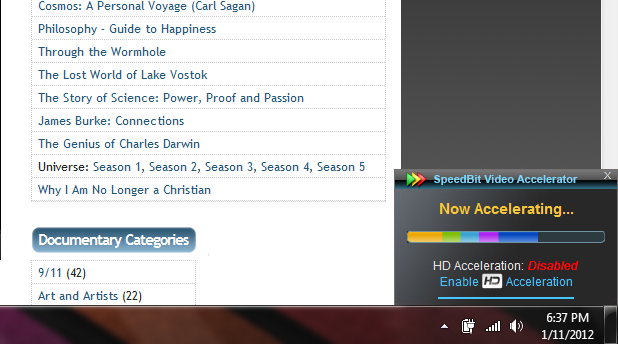
Speedbit the same company which delivers best Download Manager DAP ( Download Accelerator Plus ) has another good and cool product called Speedbit Video Accelerator,Speedbit Video Accelerator simply recovers your lost internet speed and boosts your video speed for no buffer and smoother play.
Speedbit Video Accelerator
The process to get this into work is really simple as it is just a software so install it on your Windows or Mac machine and than it automatically accelerates your YouTube or any other video’s. You can see the Accelerating Message on the right hand side corner like in the image above.
Now there’s one problem with this free software that it does not Accelerate HD Videos so you have to purchase their premium version to accelerate those videos. Well but if you are not in the plan to invest some money in this software than free version is best for you. SO for the proof I just started watching some online movies and I saw incredible change in buffer it didn’t buffer for even one time and I was able to watch movies smoothly and constantly.
Now people who are interested in this software can Download it from Video Accelerator Website, they have both PC and MAC Versions so check out which one you wanna download according to your system.

Tuesday, 17 January 2012

Over 8000 icons with Icon Changer 3.8 [Download ]


Over 8000 icons with Icon Changer 3.8 including serial !
Icon Changer is asoftware application that makes changing icons on the desktop fun and easy.
It's a hassle-free way to personalize your desktop without submerging yourself into reading books about advanced computing.

Simply click the icon you want to change, point at the one you like and that's all. Why changeicons? To make navigation easier,
to group similar applications together, to customize and spice up your desktop, of course. Try it!.

Moreover, you can use Icon Changer to change personal file icons. You can now assign an icon of your choice to each and every
file convenient on your computer. Personalize your computing experiences to make using computer a bit easier and much more.

Monday, 9 January 2012

ULTRASURF 10.01 RELEASE (BYPASS FIREWALL)


UltraSurf is a free software which enables users inside countries with heavy Internet censorship to visit any public web sites in the world safely and freely. Users in countries without internet censorship also use it to protect their internet privacy and security.
With UltraSurf started, you can use web browsers (like IE, Firefox) the same as before, but all are under UltraSurf's protection now.

UltraSurf

  • enables users inside countries with heavy Internet censorship to visit any public web sites in the world safely and freely
  • works together with the GIFT (a dynamic node-proxy anti-jamming system);
  • requires no installation or change in system setting;

ADD-ON FOR FIREFOX

Firefox users need to download the firefox add-on besides the above software:

Download Firefox add-on(.zip)

Download link:

Wednesday, 4 January 2012

How To Make Your Windows Desktop Look And Feel Like a MAC Desktop


Why not get the best of both worlds? If you’re tired of the “look and feel” of your Windows OS Desktop and you find Mac’s stylish Desktop attractive, then here’s a quick guide on how you can make it look like a Mac Desktop with a dock menu and everything. It’s an affordable and quite a creative way of getting that Mac feel you want within just a couple of minutes.
Apple’s OS desktop has always been widely considered to be cleaner, more intuitive, and more customizable than Microsoft’s. Although with the new Vista OS, windows now has a couple of nice features in regards to design. So why not have the best of both worlds by enhancing your Windows Desktop to look just like Mac’s, while still being able to work off Window’s OS.

The overall objective of this guide is to allow you to convert the actual look of your Windows Desktop into a Mac Desktop by tweaking things up and simply installing some neat applications, most of which are free to download and easy to use.
Converting Your Desktop
Transforming

Below there are two sets of instructions, Part 1 and Part 2, both of which provide you with simple steps on how to achieve the Mac look on your Windows PC. The first part will allow you to obtain the most common traits of Mac’s Desktop style to a certain extent, while the second part allows the more advanced users an extended version by continuing the customization process. If you’re not a savvy PC user, then I recommend just sticking to the first part, you’ll still get the Mac feel you’re after.'


Part 1 (Novice):
Mac Wallpaper1. Desktop Wallpaper - First lets start with your desktop wallpaper, although this first step is relatively small, it really makes the difference to browse through an almost endless selection of Mac Desktop Wallpapers on Deviantart.com. You can find all of the Panther, Tiger, and even Leopard OS Wallpapers plus more. Once you find one that you like best, just download it, save it to your computer, and change your desktop background through your Control Panel.
Cleanup Desktop2. Clean-up Your Desktop - Keep a minimalistic mindset, and a clutter-free desktop by removing all your application shortcut icons that are currently on your desktop. Remember that just because you’re removing them, doesn’t mean their deleted. They are still accessible through your Start Menu, so don’t worry. Now when it comes to folders or external hard drive icons on your desktop, I suggest to read the following step before doing anything with them since you may want to keep them on there.
Mac Icons3. Setup & Install Your New Mac Icon Sets - Now that we have a clean desktop, go ahead and download the following icon sets and save them onto your computer. Mac Icon Set 1Mac Icon Set 2, and Mac Icon Set SE. There’s a vast selection of Mac Icon Sets at DeviantArt, just browse and download the ones that you want on your computer. With these sets installed you can switch the appearance of your folder icons and external hard drive icons, along with any other icons you see fit to change. This will start to get your Windows Desktop to feel more like a Mac Desktop.
Vista Taskbar Logo4. Hide the Windows Taskbar - Now we need to get rid of the Windows Taskbar at the bottom, this is done by right-clicking on the actual Taskbar and selecting “Properties”. Once the properties window pops-up, just mark the box that says “Auto-hide the Taskbar” and click “Apply” to save the changes. You’ll notice that your Taskbar simply slides down, hiding itself, but easily reappears by putting your mouse over the lower bottom of your screen. It’s completely reversible if needed, just follow the same steps I mentioned above again, but this time un-check the box on “Auto-hide the Taskbar”, that’s all.
Mac Mouse Cursors5. Setup & Install Mac Cursor Set - It’s all about the details, so now we’re going to download and setup your new set of icon cursors for your mouse, which will give it that extra touch of the Mac’s OS. Click Here to download and save your icon cursor set onto your computer, once downloaded make sure to open the ‘Readme’ file for installation instructions.
Dock Applications6. Mac-like Dock Menu - Mac’s main menu system is a major component in making your Windows Desktop look and feel like an actual Mac Desktop, and it’s also the easiest step to take care of. Simply download either the RK Launcher or the Rocket Dock application. Both of these applications display a Mac-like Dock system which can be fully customized to fit your needs. Now you can add all your application shortcut icons straight into your very own dock, while also making good use of the Mac icon sets you downloaded earlier. You’ll really notice the transformation in this step.
Dashboard Widgets7. Add Widgets to Desktop - If you’re not running Windows Vista OS on your PC to satisfy your widget cravings, then here are a couple of Widget apps. that’ll let you install Widgets right onto your desktop just like a Mac. The two most popular Desktop Widget apps. are currently provided by Google and byYahoo, both with a massive library of Widgets. Look through them and select the one that best suits your needs, and install it along with any nice widgets you want.
Apple Apps8. Get Mac Applications - Alright, so now you’ve covered the most common traits of the Mac OS Desktop, but lets take it a bit further by installing some Windows-compatible Mac applications. From now on we’ll listen to music with the popular iTunes, we’ll browse the web 2x faster with Safari, watch our favorite videos using QuickTime, and connect to networks with Bonjour;-)
Part 2 Optional (Advanced):
Below I’ve listed three ways to get closer at achieving a Mac Desktop Interface, I don’t recommend you installing all of them, so simply choose the one that best suits your needs.
StardockStardock’s Object Desktop - An application which allows you to change the ‘theme’ (also know as the ’skin’) of your Windows OS, making it possible to have a Mac look-alike theme throughout all your screens, even converting the Taskbar to look like Mac’s. This app is best for completely emulating the look and feel of Mac’s Desktop interface, by allowing you full customization of your Windows OS. Check out Stardock’s website for more information.
portraitofakiteFlyakiteOSX (Free) - This application is an all-in-one, conveniently enhancing your Windows into a full-on Mac experience. FlyakiteOSX is a transformation pack that transforms the look and feel of an ordinary Windows XP+ system to resemble the look and feel of a Mac OS X system. The installer simply automates the process of replacing critical system files, setting registry tweaks, and installing extras such as cursors, sounds, visual styles, etc. Click Here to check it out.
ShellWM (Free, but Not Tested) - This app. is basically a titlebar-only shell replacement, it allows you to have the 3 Mac bottons (i.e. Minimize, Enlarge, and Close) on the top left-side of your windows for free. This Windows skinning application is to be used with a Win32 Shell replacement (like Litestep, geOshell, sharpE, etc.) or just native Explorer.Click Here to check out and/or download ShellWM, then click here for the Mac skin for it.
That’s it, now you’ve converted your Windows PC Desktop into a stylish Mac-like Desktop, hope you enjoy it.
Thank You.....
Happy Tranforming...

Monday, 2 January 2012

BackTrack 5 Released The Most Advanced Linux Security Distribution and LiveCD


We have of course been following BackTrack since the very early days, way back in 2006 when it was just known as BackTrack – A merger between WHAX and Auditor.  They’ve come a long way and BackTrack is now a very polished and well rounded security distro, most of the others have dropped off the map leaving BackTrack as the giant in the security LiveCD space.
The last major release was BackTrack Final 4 Released – Linux Security Distribution – back in January 2010.
The BackTrack Dev team has worked furiously in the past months on BackTrack 5, code name “revolution” – they released it on May 10th. This new revision has been built from scratch, and boasts several major improvements over all our previous releases. It’s based on Ubuntu Lucid LTS – Kernel 2.6.38, patched with all relevant wireless injection patches. Fully open source and GPL compliant.
The interesting part for me is that the new .ISO downloads offer multiple versions, including a choice between GNOME and KDE desktops and the images include ARM, 32-Bit and 64-Bit versions.
New in Version 5 :
  • Based on Ubuntu 10.04 LTS
  • Linux kernel 2.6.38 (with wireless injection patches)
  • KDE 4.6
  • GNOME 2.6
  • 32-bit and 64-bit support
  • · Metasploit 3.7.0
  • Forensics mode (a forensically sound instance)
  • Stealth mode (without generating network traffic)
  • Initial ARM image of BackTrack (for Android-powered devices)
Go to BackTrack website http://www.backtrack-linux.org/ and download. A simple few step guide would help you to make LiveCD of the OS. But you would need good internet speed for direct download otherwise it sucks (True Broadband in India is still a dream). All the best.


Sunday, 4 December 2011

Auto Hide Ip Full Version


Auto Hide IP – Hide Your IP Address, Surf Anonymously, Protect Your Identity, Guard Against Hackers
Be careful! Have you ever been aware of your IP adress? Your IP exactly points to your location, with very high precision, right to the door of your apartment. Every time you visit a website, your IP address is completely exposed.
Auto Hide IP will help you conceal your real IP and protect your identity online. You need not worry about your privacy and security any more. Browse anonymously with one click from now on.


Key Features


  • Anonymous Web Surfing
    Assign you fake IP addresses which will make hackers taken in, by this way, your IP could be disguised from online predators.
  • Protect Your Identity
    Hide your real IP when surfing the web to prevent hackers or identity thieves from monitoring your web activity or stealing your personal information such as your financial information.
  • Choose IP Country
    You decide to use fake IP from different countries via “Choose IP Country” option and you can check the current IP directly.
  • Send Anonymous E-mails
    Hide your real IP address in email headers. Be protected in email-sending from Yahoo!, Hotmail and GMail, etc.
  • Un-ban Yourself from Forums and Message Boards
    Use Auto Hide IP to change your IP, then you can get access to any forums or restricted websites that have banned you.

How It Works?


smallhowitworks.jpg


Download Here:


Popular Posts